
Library
The library lets you store and reuse content across projects, and share it to users in your organization. Use it for scripts, variables, functions, and materials. Some predefined items are available, and an organization can build its own library of commonly used content.
To access the library, click your profile icon on the top right corner of home view, go to Settings, and select Library.
In the library settings view, you can edit content saved to your library. You can add new assets there or from your projects.
Scripts
Section titled “Scripts”The script library lets you reuse scripts across simulations.
Add to library
Section titled “Add to library”Store a script to the library from the script view bottom controls:
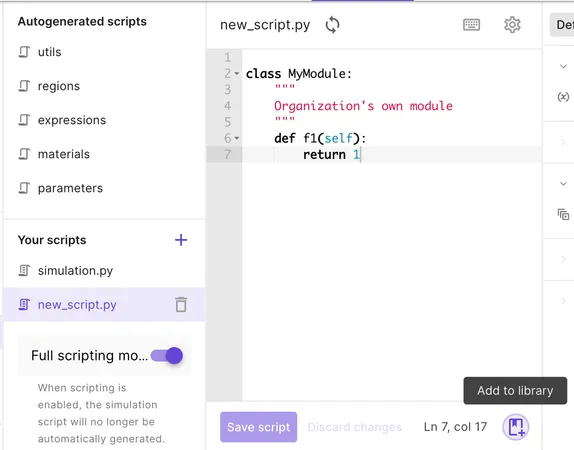
Edit your library script from the library settings view after storing.
Making changes locally is not reflected in the library script automatically. To update the library script from your local version, add it to library again and remove the old copy.
Add from library
Section titled “Add from library”After storing a script to the library, you can then add it to other simulations from the library:
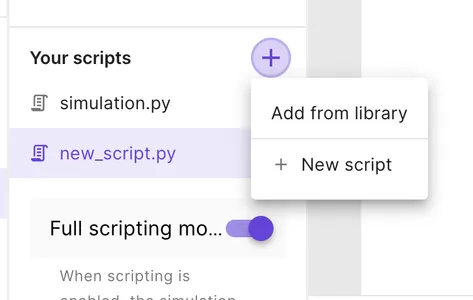
Local changes to the script after adding are not reflected in the library. To update the library version of the script, add it again and remove the old version.
Materials
Section titled “Materials”The material library lets you reuse material definitions across projects. See Working with materials for adding materials, configuring properties, and assigning them to geometry volumes.
Add to library
Section titled “Add to library”Store a material to the library from the material settings panel bottom controls. Select Add to library to save the material to your personal library.
Edit your library material from the library settings view after storing.
Making changes to a project material is not reflected in the library material automatically. To update the library material from your project version, add it to the library again and remove the old copy.
Add from library
Section titled “Add from library”When adding a material to a project, select From library in the add menu and pick a Global or organization material. The material and its properties are copied into the project.
Local changes to the project material after adding are not reflected in the library. To update the library version, add the material to the library again from the project and remove the old version.